# Create an Ad Account

### What is an Advertising Account?

An advertising account is an account through which you can book campaigns.

In the AdControl console, you can **manage received bookings** and also **book campaigns**. To book a campaign, you need to create an advertising account first.

You can create an advertising account as follows:

1. Go to **Settings > Ad Platform > View My Ad Platform.**

<figure><img src="https://1229048154-files.gitbook.io/~/files/v0/b/gitbook-x-prod.appspot.com/o/spaces%2FdbXqzAGZzRMkuFk2wG7Q%2Fuploads%2FPmqU3BXpnlssRCFnTRQz%2FScreenshot%202025-08-04%20at%205.41.41%E2%80%AFPM.png?alt=media&#x26;token=13b3db35-eff7-486c-baa0-97c8a200ed20" alt=""><figcaption></figcaption></figure>

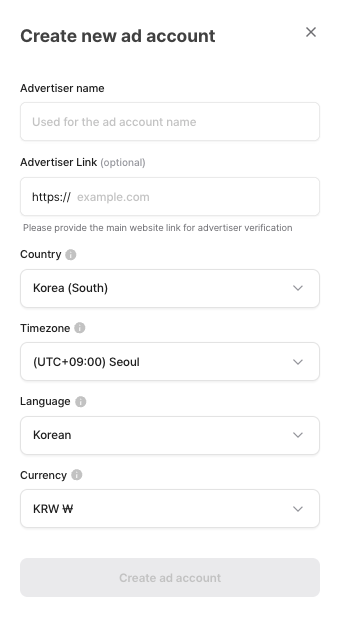
2. When you click, an advertiser platform window will open.
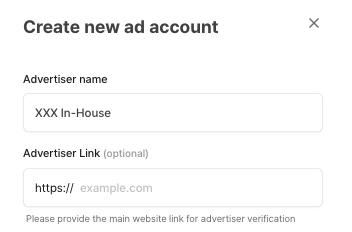
3. Fill advertiser name and add URL of the advertiser. Then, click "Create an Ad Account."

<figure><img src="https://1229048154-files.gitbook.io/~/files/v0/b/gitbook-x-prod.appspot.com/o/spaces%2FdbXqzAGZzRMkuFk2wG7Q%2Fuploads%2F2MePGWt1Iv7yOyAYZkRE%2FScreenshot%202025-08-04%20at%205.42.26%E2%80%AFPM.png?alt=media&#x26;token=331f769a-2656-4ea9-84a5-42b8e7054971" alt=""><figcaption></figcaption></figure>

### C**reating an In-House Advertising Account**

1. **In the ‘Advertiser Name’ field, enter names like "XXX In-House Advertising Platform," "\[DEV] XXX," or "XXX In-House" to freely create your in-house advertising accounts.**
2. **For ‘Advertiser Link,’ please enter your main website URL.**

<figure><img src="https://1229048154-files.gitbook.io/~/files/v0/b/gitbook-x-prod.appspot.com/o/spaces%2FdbXqzAGZzRMkuFk2wG7Q%2Fuploads%2FkEIl4epylRysDwYtmUex%2FScreenshot%202025-08-04%20at%205.44.30%E2%80%AFPM.png?alt=media&#x26;token=4db9145c-9325-4b64-9e5a-644e59ae719f" alt=""><figcaption></figcaption></figure>