# Setting the Campaign Creative Browser in Console
You can set the **target browser** for each campaign creative in the console.
* **If the campaign was created by the advertiser**:\
After the creative is registered. by the advertiser, the media partner(you) can edit the creative in their console and choose the desired browser, default browser or in app browser.
* **If the campaign was created in the console**:\
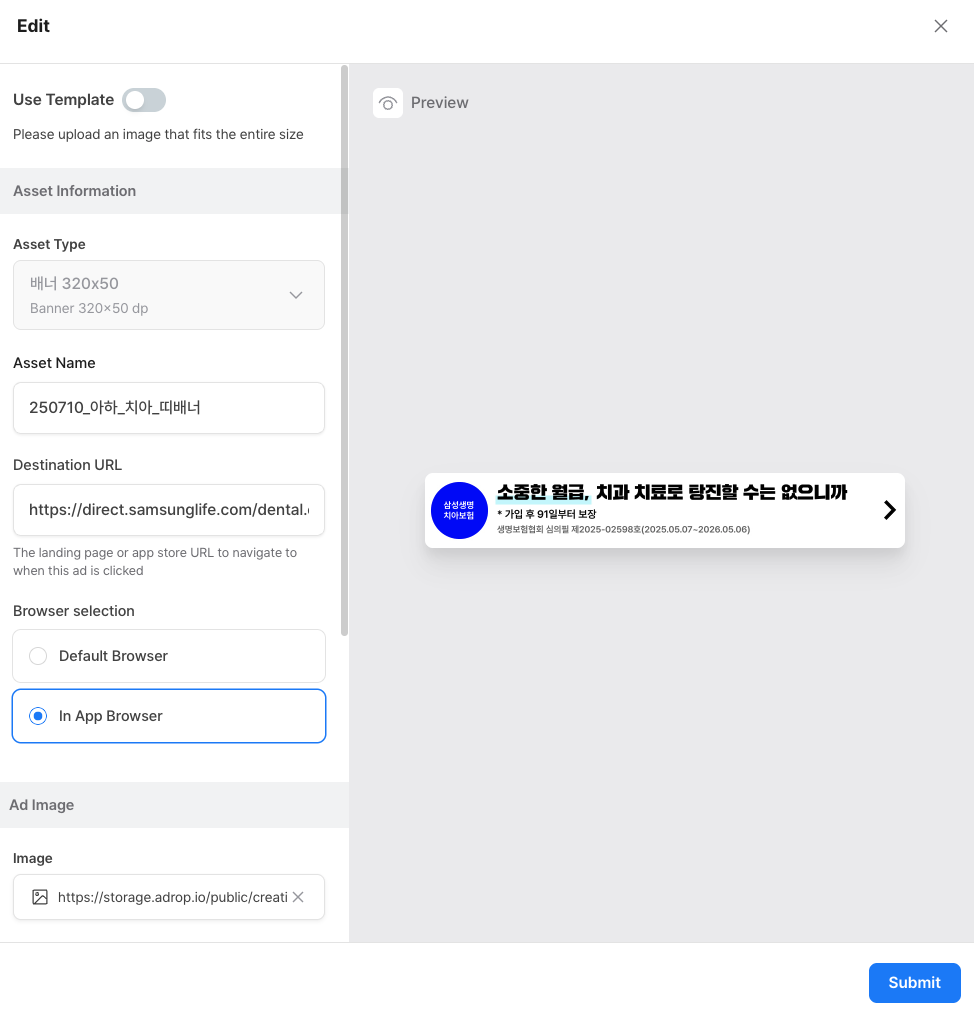
You can select the browser **during both creative registration and editing**.
### H**ow to Set the Creative Browser When Registering a Creative**
1. After creating a campaign in the console, go to the **"Booking"** tab.
2. Select the campaign you want to manage.
3. In the campaign detail pop-up, scroll down and add the required creatives.
4. During this process, you can **set the target browser** for each creative.
5. In the **"Asset Information"** section of the creative registration menu, you can choose the desired **browser**.\
You can select either:
* **Default browser** (opens the link in the **user’s default mobile browser,** such as Chrome or Safari)
* **In-app browser** (opens inside the app and allows users stay within the app environment without switching to another browser.)
How to Change the Destination Browser When Editing a Creative
* Go to the **"Booking"** tab in the console and select the campaign with the registered creative.
* In the campaign detail menu, scroll down and select the creative you want to update and click the **"Edit"** button.
* In the **"Asset Information"** section, go to the **"Browser Selection"** and make your changes.
Click **"Submit"** to save your changes. The destination browser setting will be updated accordingly.